
At-Tartil 5.0
User guide
Every feature of the app — with pictures and step-by-step explanations. Pick a section or search.
Nothing found. Try a different word.
Getting started: sign in and sign up
On first launch the app opens straight to Home in guest mode. Create an account and get 7 days of every feature for free.
Signing in
-
1
Open the sign-in screen
Tap a locked section and choose Sign in, or go to Settings → Login to system.
-
2
Phone number or email
Choose the Phone number or Email tab, enter your details and tap Continue.
-
3
Enter your password
If the account is found, enter your password and tap Log in. Forgot it? Forgot your password? → 4-digit code → new password.
Creating an account
-
1
Your details
Enter your Full name and a password (at least 8 characters, letters and numbers). Phone or email: one is required, the other is optional.
-
2
Referral code (optional)
Enter a friend's code via Add a referral code and you both get 30 days of free subscription.
-
3
Confirm the code
Enter the 4-digit code sent to your phone or email. If it doesn't arrive, wait for the timer and tap Resend the code.
-
4
7-day trial
Start exploring — everything is open for 7 days. No card required.
Home
The heart of the app. Every section opens from here, and the back button always brings you back here.
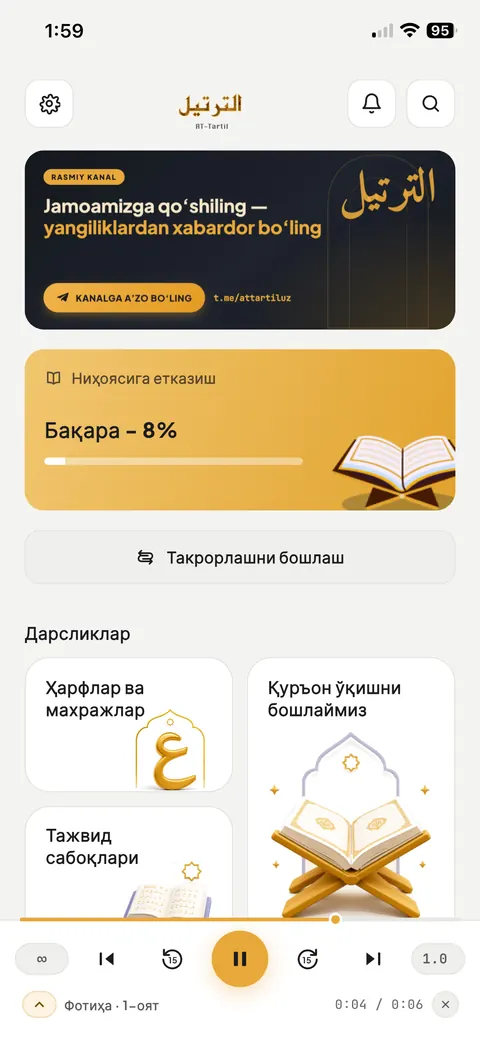 12345678
-
1
Settings
Profile, subscription, language, night mode and more.
-
2
Notifications
The red number shows how many messages are unread.
-
3
Search the ayahs
Find an ayah by an Arabic word.
-
4
News banner
Announcements and news. Tap it to open the related page.
-
5
Finish reading
The last surah you read and your progress. Tap it to continue from that exact ayah.
-
6
Start review
Memorise ayahs by repetition (more).
-
7
Courses
Letters & articulation, Tajweed lessons, Learn to read the Qur'an, 30 Juz Qur'an recitation, Tasbih.
-
8
Mini player
While a recitation is playing, it stays at the bottom of every screen.
Mushaf: reading the Qur'an PRO
Read the pages of the Madina Mushaf or a list of ayahs. Open it from the Finish reading card or Learn to read the Qur'an.
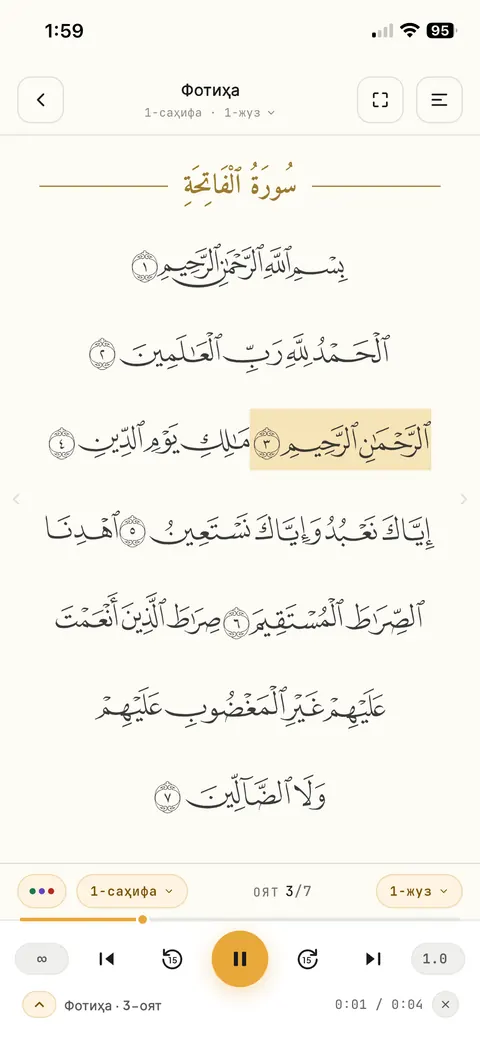 1234567
-
1
Surah name
Tap it to open Jump to: enter a page, juz or ayah number and tap Go.
-
2
Hide panels
Extra panels are hidden and the text appears larger.
-
3
Recitation settings
Mushaf edition, page colour, text size, tajweed colours (more).
-
4
Tap an ayah
The ayah menu opens: Play, Repeat, I stopped here, Copy, Share, Bookmark.
-
5
What the tajweed colours mean
The coloured dots open the colour key.
-
6
Page / juz
Jump quickly to another page or juz.
Reading position and bookmarks
-
1
I stopped here
Mark it from the ayah menu — Finish reading on Home will continue from this exact ayah.
-
2
Add a bookmark
Bookmark in the ayah menu adds the ayah to My bookmarks. Tap it again to remove it.
-
3
Sajdah ayahs
The sajdah word has a gold line above it and the ۩ sign.
Mushaf appearance and tajweed colours PRO
The ☰ button on the reading screen → Recitation settings. Every change is saved instantly.
Settings
-
1
Reading mode
Book view — a printed Mushaf page. Qur'an text — ayahs shown as cards.
-
2
Mushaf edition
Choose an edition: Madina — Uthmani script (15 lines), Madina — 1421 AH edition, Colour-coded tajweed (BETA), Digital Khatt (BETA). Tap Select and the edition downloads in the background.
-
3
Page color
Classic, White, Sepia, Green or Night paper.
-
4
Arabic text size
Use the slider to make the text bigger or smaller.
-
5
Tajweed colours
Turn them on or off. What the colours mean shows which rule each colour marks.
Recitation player and offline listening PRO
The ayahs are recited by Jahongir Qori Nematov. Once you've listened to an ayah, it is saved on your device and then plays offline.
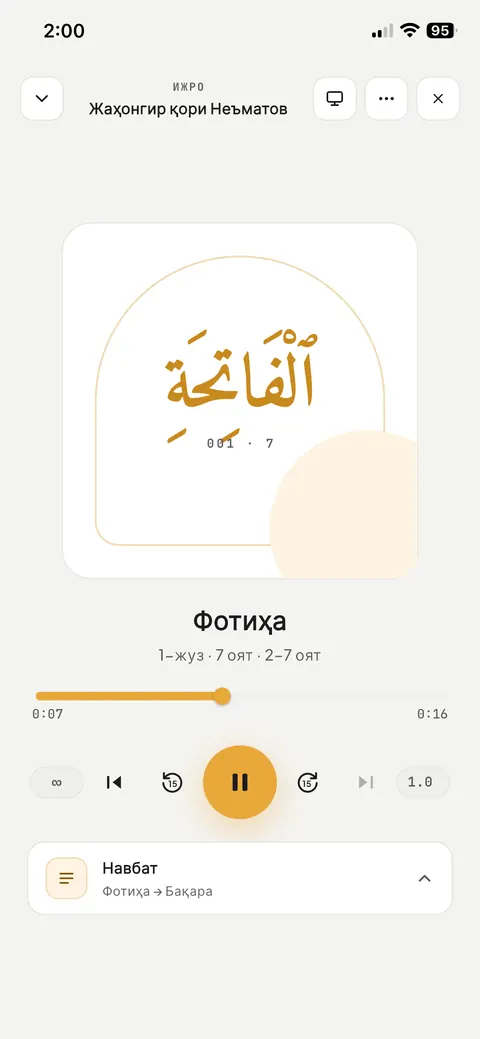 12345678
-
1
Minimise
Closes the full player and returns to the mini player. ↑ on the mini player opens it again.
-
2
Cast to a device
AirPlay, a Bluetooth speaker or your car.
-
3
Appearance
Standard, Car mode (large buttons), TV / speaker.
-
4
∞ — endless repeat
Repeats the current ayah non-stop. It stays on when you tap ⏮ / ⏭ — the new ayah repeats instead. Your choice is remembered even after closing the app.
-
5
⏮ / ⏭ — previous and next ayah
⏮ goes to the previous ayah; on the first ayah of a surah it returns to the start of the ayah.
-
6
−15 / +15
Back or forward 15 seconds within the current ayah.
-
7
Speed
From 0.5× to 2×: Slow, Natural, Fast. The chosen speed is remembered.
-
8
Queue
The play queue and choosing another surah.
Mini player
-
1
Top bar
Shows which part of the ayah is playing. Tap or drag to jump there.
-
2
Buttons
The same as in the full player: ∞, ⏮, −15, ▶, +15, ⏭ and speed.
-
3
↑ — Full player
Opens the large player.
-
4
Surah name
Tap it to open the reader with the playing ayah highlighted.
-
5
Time and ✕
Elapsed and total time of the ayah. ✕ closes the player.
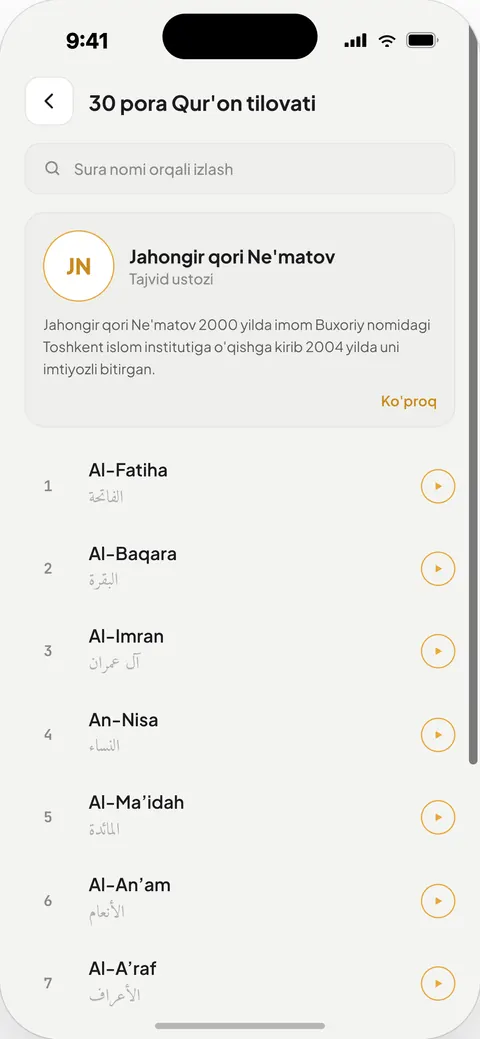
30 Juz Qur'an recitation (video)
The 30 Juz Qur'an recitation card on Home — video recitation of all 114 surahs. Pick a surah from the list; videos can be watched full screen.
Review: memorising ayahs PRO
Choose a range of ayahs and set how many times to repeat — the app recites, and you repeat after it.
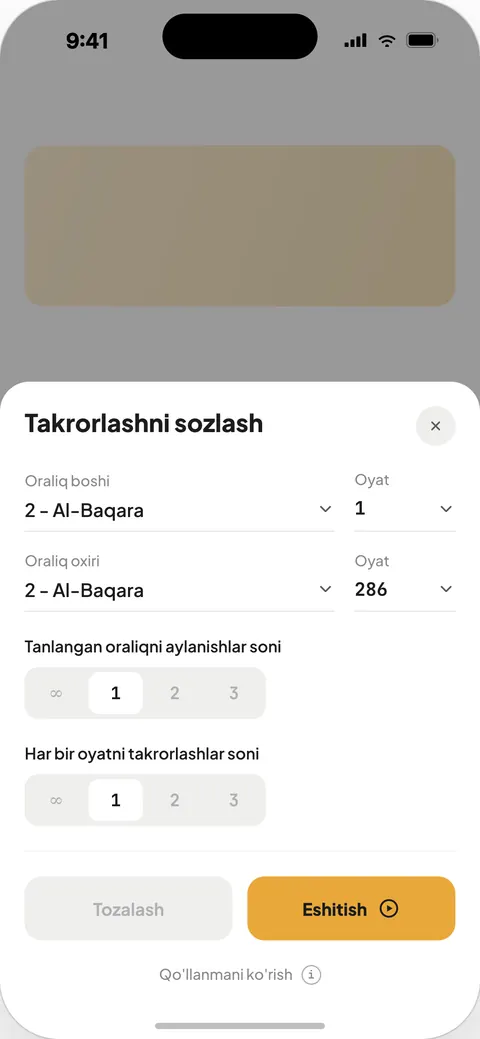 123456
-
1
From
The starting surah and ayah.
-
2
To
The ending surah and ayah. The range can span several surahs.
-
3
Number of cycles for the range
How many times to repeat the whole range: 1 to 100 or ∞ (until you stop it).
-
4
Repeats per ayah
How many times in a row each ayah is recited (1–100).
-
5
Clear
Resets all values to the defaults.
-
6
Listen ▶
Review starts: the Mushaf opens and follows the ayah being recited.
My bookmarks (saved ayahs) PRO
The ayahs you save in the Mushaf are collected here. On Home: My bookmarks → Show all.
-
1
Open the ayah
Tap a card — the Mushaf opens at that exact ayah and briefly highlights it.
-
2
Listen
The ▶ button plays the ayah's recitation.
-
3
Search
🔍 — search by surah name.
Tajweed lessons
The Tajweed lessons card on Home. It has three sections.
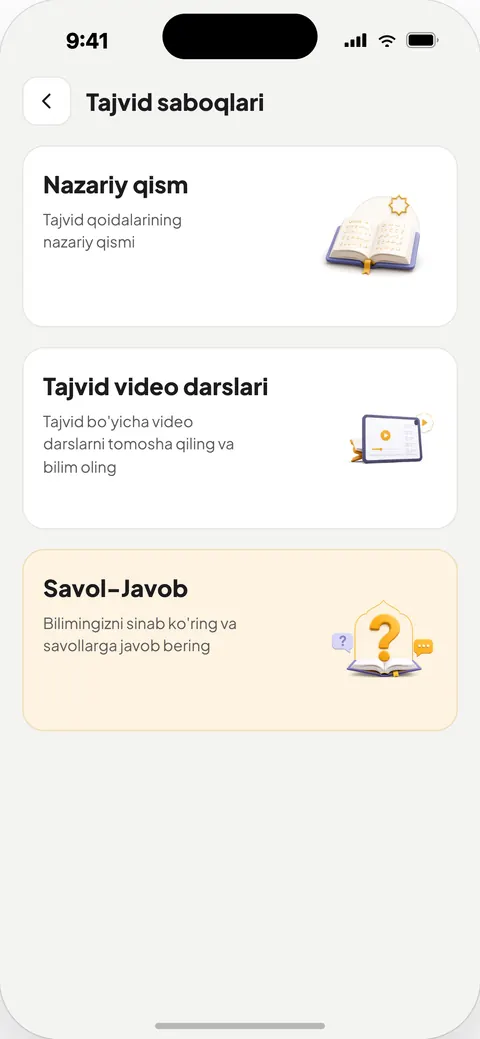 123
-
1
Theory (PRO)
Tajweed rules by module, with search.
-
2
Tajweed video lessons
Video lessons from the teacher (sign-in required).
-
3
Quiz (PRO)
Test your knowledge (more).
 1234
Lesson page
-
1
Parts
If a lesson has several parts, they appear as tabs.
-
2
Video
Play, seek and full-screen buttons are on the video itself.
-
3
Rule text
A short summary of the lesson.
-
4
Examples
Arabic examples of the rule.
Letters & articulation
The Arabic letters and their points of articulation (makhraj) — for anyone learning to read the Qur'an from the very beginning.
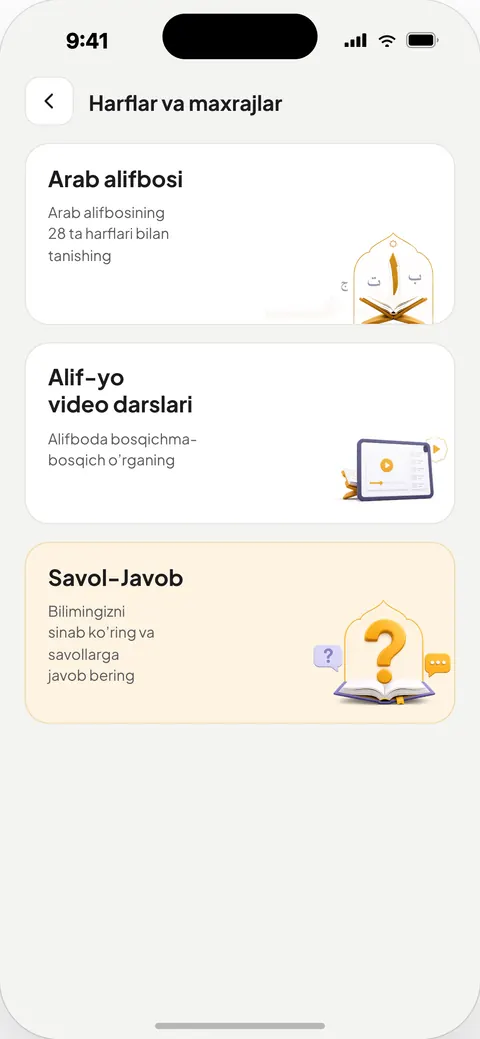 123
-
1
Arabic alphabet (PRO)
28 letters. Tap a letter to hear it with the vowel marks and sukun; Show articulation point shows a picture of where it is pronounced.
-
2
Alif-ya video lessons
Step-by-step video lessons on the alphabet (sign-in required).
-
3
Quiz (PRO)
A test on the letters.
Quiz (test) PRO
Each time, up to 10 new questions are picked from the server. Available in Tajweed lessons and Letters.
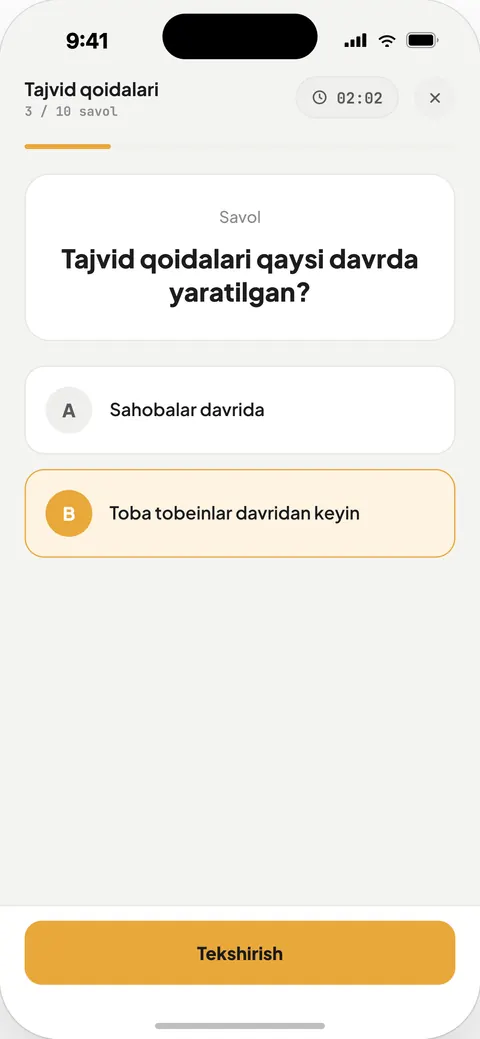 1234
-
1
Question number
Which question you're on.
-
2
Time
The time you've spent is counted.
-
3
Choose an answer
Tap one of the options.
-
4
Check
You'll see whether the answer is Correct or Wrong, then Next question.
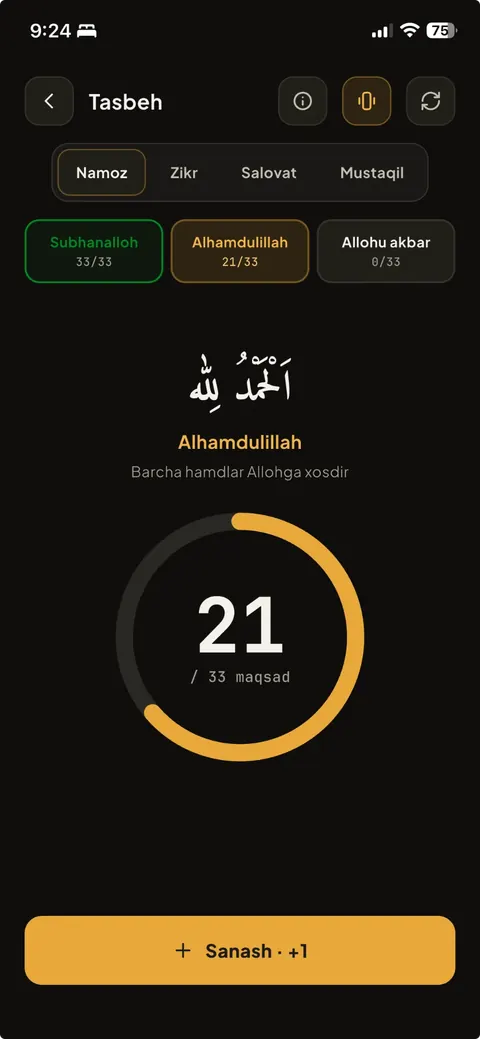
Tasbih
Tasbih after prayer, dhikr, salawat and your own counters. Free and works offline.
 12345
-
1
Tabs
Prayer (33 + 33 + 33 + 1), Dhikr, Salawat, Custom.
-
2
About
Information about the Tasbih section.
-
3
Vibration
The phone vibrates on every count.
-
4
Reset
Start counting from zero.
-
5
Counting
Tap the lower part of the screen or the Count · +1 button. When you reach the goal, it moves on to the next dhikr automatically.
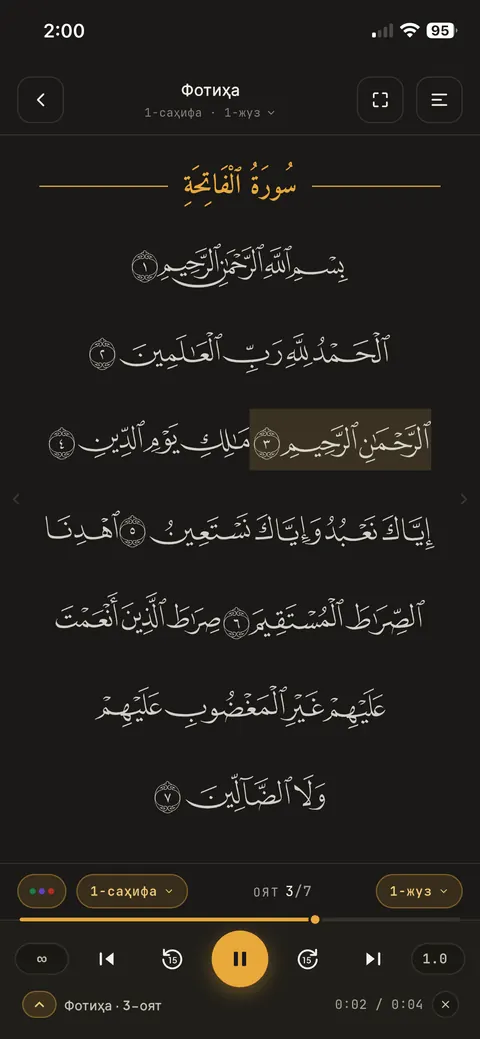
Night mode
A dark look that is easy on the eyes at night. Tajweed colours stay clear in the dark too.
-
1
For the whole app
Settings → Night mode. Set the theme to System to follow your phone's setting.
-
2
For the Mushaf only
Recitation settings → Page color → Night.
Pro subscription and payment
Pro unlocks the Mushaf, recitation, review, bookmarks, theory lessons and quizzes. No automatic charges — you confirm every payment yourself.
Subscribing
-
1
Choose a plan
Settings → the subscription card (Subscribe) or See the plans in a locked section. 1, 3, 6 months or a year.
-
2
Payment method
Payme, Click or By card.
-
3
Payme / Click
The payment page opens. After paying, return to At-Tartil and tap Check the payment.
-
4
By card
Enter the card number and expiry date → Send code → the SMS code sent to the number linked to the card → Confirm and pay.
Gifting Pro
Give a Pro subscription to your loved ones — it unlocks for them right away.
-
1
Gift window
Settings → Gift a subscription.
-
2
To
The recipient's phone number or email (they must be registered in At-Tartil).
-
3
Greeting
What to write on the card — for example, “A gift for my dear mother”.
-
4
Payment
Send the gift → plan → Payme or Click.
Referral: invite your friends
When a friend signs up with your code, you both get 30 days of free subscription.
 1234
-
1
Referral screen
Settings → Referral. You need to be signed in.
-
2
Your referral code
Tap the icon next to it to copy the code.
-
3
Referral statistics
How many users you have invited and the list (name and date).
-
4
Share your referral
A ready message with the app download link and your code — send it via Telegram or any other app.
How your friend enters the code
-
1
Sign up
On the sign-up screen they tap Add a referral code.
-
2
Activate
They type the code and tap Activate — “Code is valid — 30 bonus days” appears.
-
3
30 days for both of you
Once they finish signing up, you and your friend each get 30 days of free subscription.
Notifications and quick questions
News, greetings and tajweed Quick questions. The 🔔 icon on Home.
-
1
List
Grouped by today, yesterday and date. Unread ones have a gold background. Mark all read marks them all.
-
2
Quick question
Choose True or False. If you got it wrong, See the answer shows the teacher's video explanation.
-
3
Turn on notifications
Settings → Notifications opens your phone's settings.
Settings
The ⚙ icon in the top-left corner of Home.
-
1
Profile
Tap your name and phone number.
-
2
Language
12 languages: Uzbek (Latin and Cyrillic), Russian, English, Turkish, Kazakh, Kyrgyz, Tajik, Turkmen, Arabic, German, French.
-
3
Night mode
Dark theme (more).
-
4
Support center
Choose the problem, describe it and tap Send via Telegram — device details are added automatically.
-
5
Rate the app
Your feedback matters to us.
-
6
About the app
Official permit of the Committee for Religious Affairs, contacts and Sources & licenses.
Frequently asked questions
Is the app free?
Downloading the app is free. Tasbih is free; video lessons and the 30 Juz video recitation are free once you sign in. The Mushaf, recitation, review, bookmarks, Arabic alphabet, theory lessons and quizzes are Pro. After signing up, everything is free for 7 days.
Does Pro renew automatically?
No. You confirm every payment yourself; nothing is charged to your card automatically.
Will I keep Pro if I change phones?
Yes. Pro is tied to your account — just sign in with the same account on your new phone.
Can I listen to the recitation offline?
Yes. Once you've listened to an ayah, its recitation is saved on your device and then plays offline. Video lessons and the 30 Juz video recitation need an internet connection.
How do I repeat one ayah endlessly?
Tap the ∞ button in the player. To repeat several ayahs, see the Review section.
I forgot my password. What should I do?
On the sign-in screen tap Forgot your password? — a 4-digit code is sent to your phone or email, then you set a new password.
Is there a translation of the meanings or tafsir?
Not in the current version 5.0. It is planned for future versions.
Where can I write if I have a problem?
Settings → Support center, Telegram: @inquiryuz or support@attartil.uz.
Haven't downloaded it yet?


Updated: 2026-10-31 · At-Tartil 5.0